Command Palette
Search for a command to run...
一键部署 SmolLM3-3B-Model
一、教程简介

SmolLM3-3B 由 Hugging Face TB(Transformer Big)团队于 2025 年 7 月开源发布,定位「端侧性能天花板」,相关论文成果为「SmolLM3: smol, multilingual, long-context reasoner」。它是一款革命性的 30 亿参数开源语言模型,旨在以 3B 的紧凑规模下,突破小型模型的性能极限。
本教程采用资源为单卡 RTX 5090 (32 GB),安装环境为 PyTorch 2.8 + CUDA 12.8 。 Gradio 应用加载时间预估为 2-3 分钟。
二、项目示例
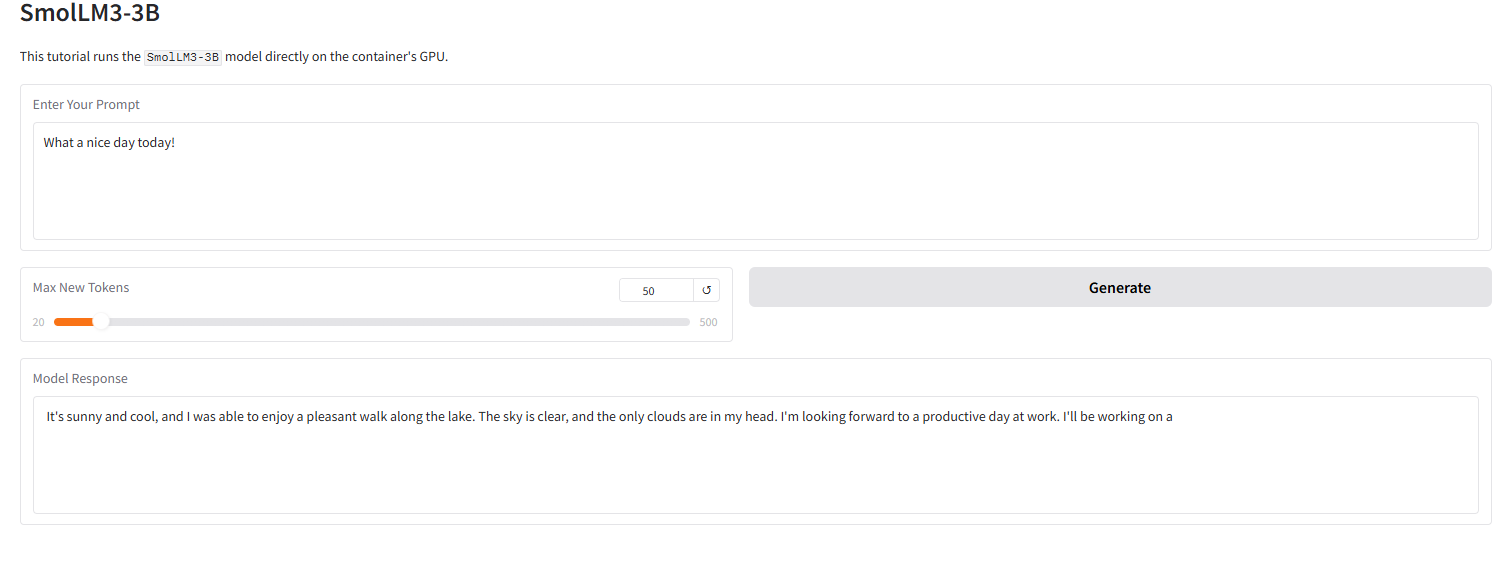
下图展示了本教程 Gradio 界面的运行效果。我们输入了一个提示词,模型成功地给出了 4-bit 量化后的回答。
三、运行步骤
本部分包含一键启动说明、代码目录结构以及常见问题。
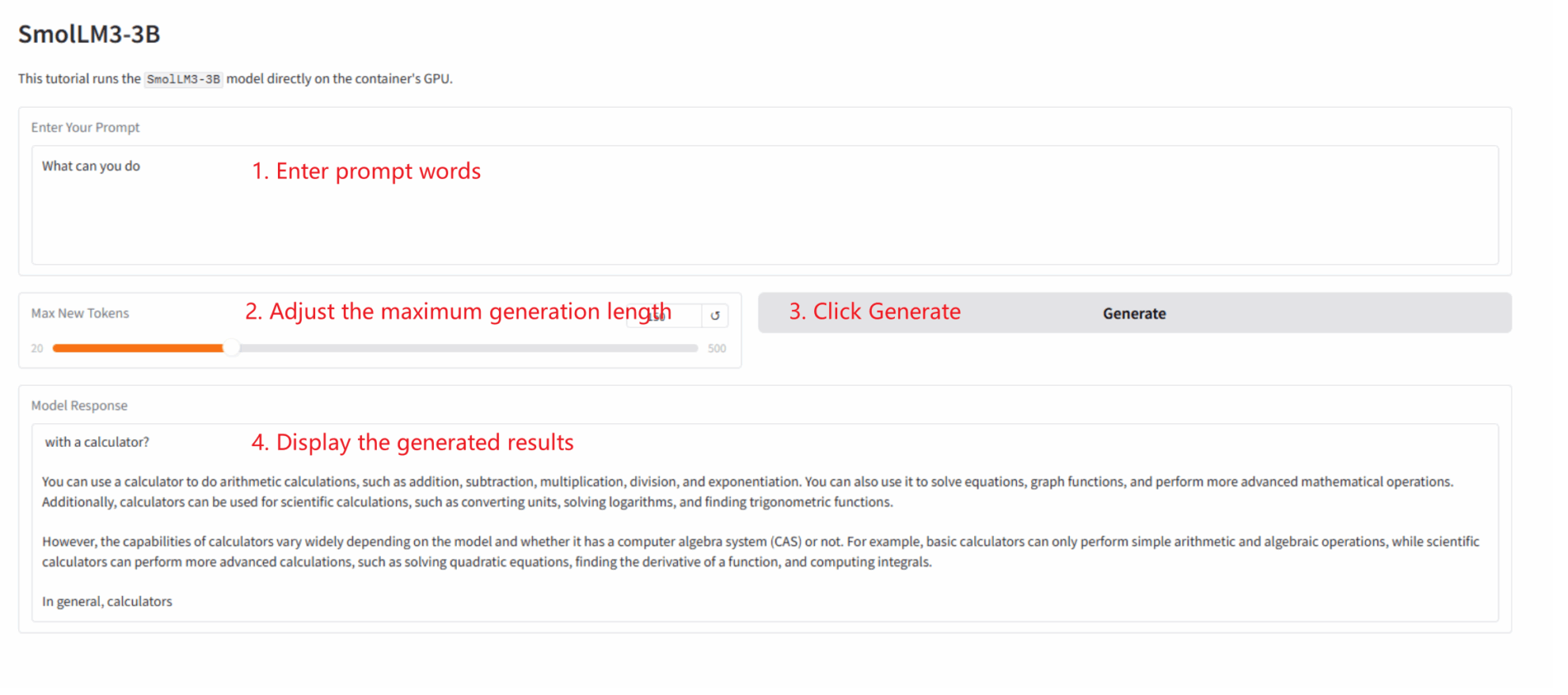
本教程为「一键部署」Gradio 应用,用户无需执行代码,只需按以下步骤操作:
1. 克隆教程: 在本页面右上角点击「克隆」,创建您的个人容器。
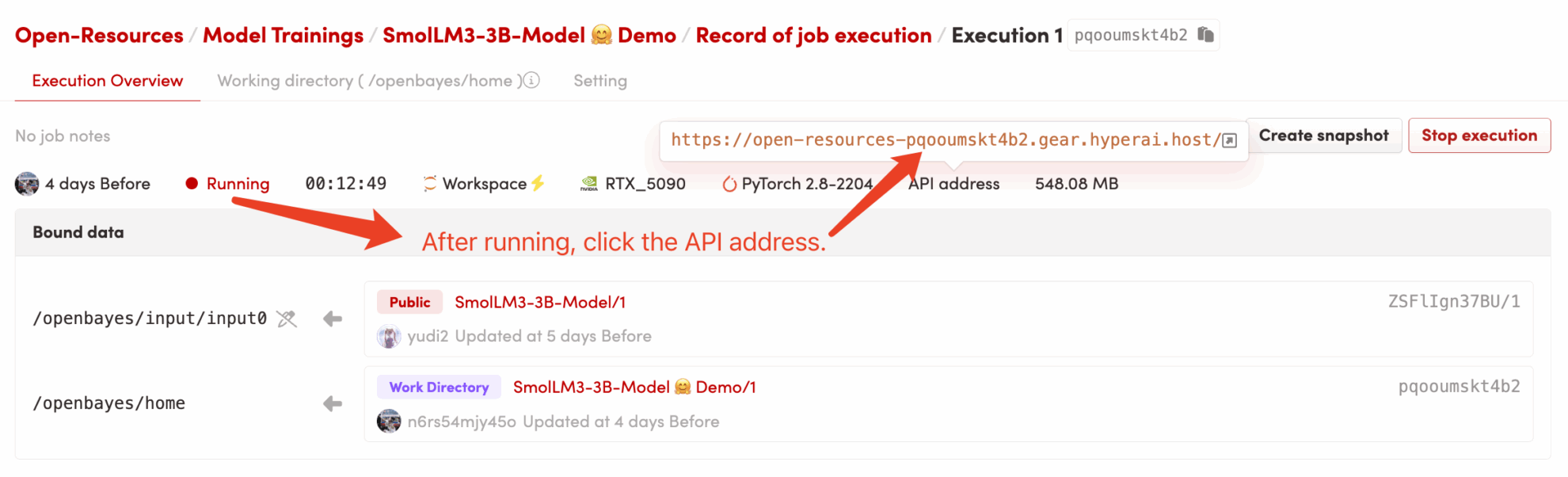
2. 启动容器并等待: 系统会自动为您启动容器(推荐使用 RTX 5090)。 dependencies.sh 脚本会后台自动运行,加载 4-bit 量化模型。此过程约需 2-3 分钟。
3. 访问应用: 待容器状态变为「运行中」后,点击容器详情页的「API 地址」,即可打开 Gradio 界面。
代码目录结构
/openbayes/home
|-- app.py                \# Gradio 应用的启动脚本
|-- requirements.txt      \# 锁定的 Python 依赖包 (已预装)
|-- dependencies.sh       \# 平台自动化执行脚本 (仅启动 app)
|-- README\_cn.md          \# 本教程说明文档 (中文)
\`-- README\_en.md          \# 本教程说明文档 (英文)

/openbayes/input/input0   # 只读绑定的 SmolLM3-3B 模型文件
常见问题
- Q: 点击 “API 地址” 后,页面无法加载或显示 “502”? A: 这是因为模型正在加载中。
SmolLM3-3B是一个大型模型,即使是 4-bit 量化版也需要 2-3 分钟才能完全加载到 GPU 。请您耐心等待几分钟后,再刷新页面。 - Q: 日志中出现
OSError: Cannot find empty port 8080? A: 这是因为您(或系统)多次尝试启动应用,导致 8080 端口被 “僵尸进程” 占用。您只需在容器终端中运行pkill -f "python /openbayes/home/app.py"来清理旧进程,然后重新运行bash /openbayes/home/dependencies.sh即可。
四、交流探讨
如果您在运行中遇到问题,或希望交流 AIGC 教程制作,欢迎扫码加入交流群:

引用信息
@misc{bakouch2025smollm3,
      title={{SmolLM3: smol, multilingual, long-context reasoner}},
      author={Bakouch, Elie and Ben Allal, Loubna and Lozhkov, Anton and Tazi, Nouamane and Tunstall, Lewis and Patiño, Carlos Miguel and Beeching, Edward and Roucher, Aymeric and Reedi, Aksel Joonas and Gallouédec, Quentin and Rasul, Kashif and Habib, Nathan and Fourrier, Clémentine and Kydlicek, Hynek and Penedo, Guilherme and Larcher, Hugo and Morlon, Mathieu and Srivastav, Vaibhav and Lochner, Joshua and Nguyen, Xuan-Son and Raffel, Colin and von Werra, Leandro and Wolf, Thomas},
      year={2025},
      howpublished={\url{[https://huggingface.co/blog/smollm3](https://huggingface.co/blog/smollm3)}}
}