Command Palette
Search for a command to run...
Docling Technical Report
Docling Technical Report
Docling: Document parsing tool
Abstract
This technical report introduces Docling, an easy to use, self-contained, MITlicensed open-source package for PDF document conversion. It is powered by state-of-the-art specialized AI models for layout analysis (DocLayNet) and table structure recognition (TableFormer), and runs efficiently on commodity hardware in a small resource budget. The code interface allows for easy extensibility and addition of new features and models.
One-sentence Summary
IBM Research's AI4K Group presents Docling, an MIT-licensed open-source package for PDF document conversion that leverages specialized AI models—DocLayNet for layout analysis and TableFormer for table structure recognition—to deliver efficient, self-contained processing on commodity hardware and an extensible interface for integrating new features.
Key Contributions
- Docling is an MIT-licensed, self-contained Python library that converts PDF documents entirely locally on commodity hardware with a small resource budget.
- It integrates DocLayNet for layout analysis and TableFormer for table structure recognition to recover page layout, reading order, and table structures.
- The tool provides conversion to JSON or Markdown, metadata extraction, optional OCR, configurable batch and interactive processing modes, and an extensible architecture for adding new models and features.
Introduction
The challenge of converting PDFs into machine-processable formats stems from extreme document variability, weak standardization, and the loss of structure inherent in print-optimized layouts. This matters increasingly for modern applications like retrieval-augmented generation (RAG) that need to unlock rich PDF content. While powerful commercial and cloud document understanding solutions exist, only a handful of open-source tools are available, leaving a substantial feature and quality gap compared to proprietary offerings. The authors address this with Docling, an open-source, self-contained Python library that brings specialized, locally executable AI models for layout analysis and table structure recognition, enabling fast, extensible, and license-permissive PDF conversion on commodity hardware.
Dataset
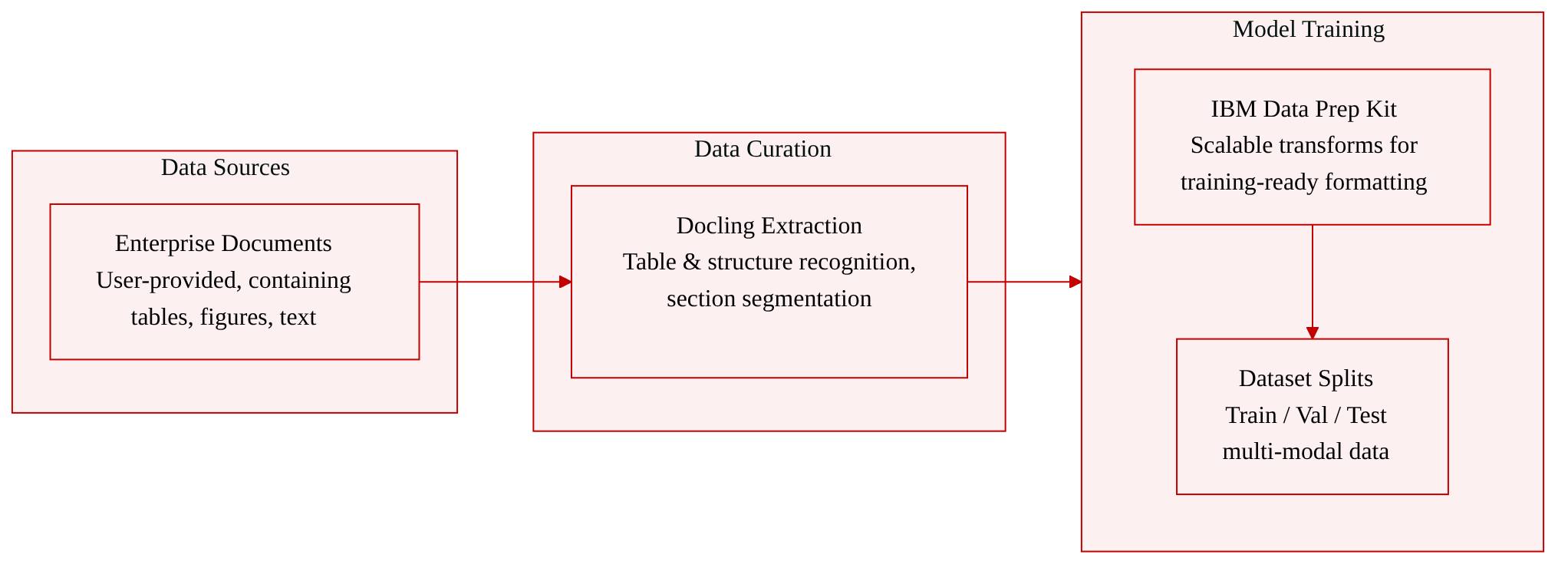
The authors describe Docling’s abilities to generate richly structured document outputs that can be turned into datasets for downstream machine-learning and knowledge-extraction tasks. Rather than releasing a single static dataset, the paper outlines how these outputs can be composed into document-derived corpora and how Docling integrates with the open IBM data prep kit to build large-scale multi-modal training datasets.
- Dataset composition and sources: The data originates from documents processed by Docling, which extracts structures such as tables, figures, section headings, and references. The actual documents come from user-provided enterprise collections (the paper does not specify a fixed corpus).
- Key details for each subset: No explicit subsets, sizes, filtering rules, or source distributions are given. The focus is on the conversion tool’s output quality, not on a concrete dataset split.
- How the paper uses the data: Docling’s structured output supports retrieval-augmented generation (via the open-source
quacklinghelper), passage retrieval, classification, and knowledge-base construction. For training-data creation, Docling is integrated into the IBM data prep kit, which applies scalable transforms to raw documents, making the outputs ready for large-scale multi-modal model training. - Processing details: Docling performs table structure recognition, section segmentation, and reference extraction. The IBM data prep kit provides the necessary pipelines to transform these structured outputs into training-ready formats; no cropping strategy or metadata construction specifics are detailed beyond the table and structure recognition.
Method
The authors design Docling as a linear processing pipeline that executes sequentially on each given document. As shown in the figure below, the workflow begins with parsing the PDF pages, followed by a customizable model pipeline that extracts various features, and concludes with assembling the results and serializing the output.
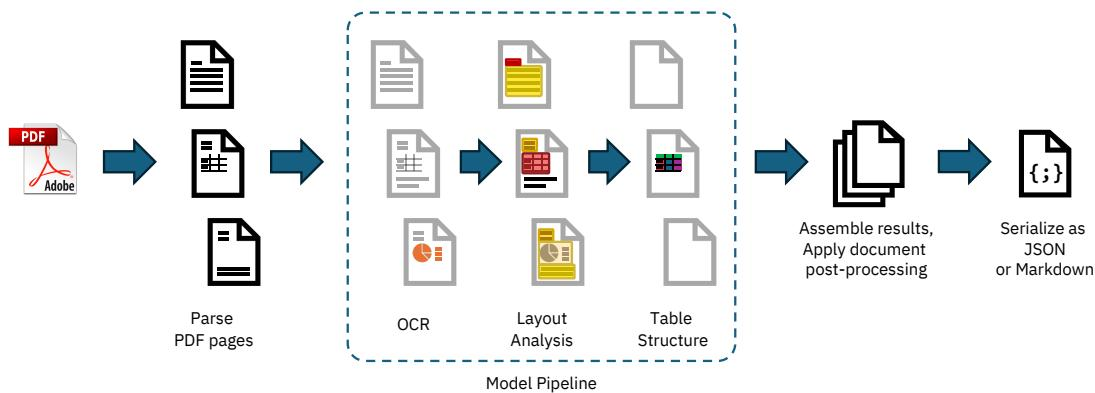
The pipeline initiates with a PDF backend responsible for retrieving all text content along with their geometric coordinates on each page, as well as rendering the visual representation of each page. To address limitations in existing open-source libraries, the authors provide multiple backend choices, including a custom-built parser based on the qpdf library and an alternative relying on pypdfium.
Following the initial parsing, the standard model pipeline applies a sequence of AI models independently on every page. The first component is an optional OCR module leveraging EasyOCR to handle scanned PDFs or embedded bitmap images. The core of the pipeline features a layout analysis model, which is an object detector derived from RT-DETR and trained on the DocLayNet dataset. This model predicts the bounding boxes and classes of various page elements. The predicted proposals are post-processed to remove overlaps and intersected with the extracted text tokens to group them into meaningful units like paragraphs, titles, and tables. For table structure recognition, the authors integrate TableFormer, a vision-transformer model that predicts the logical row and column structure and identifies header and body cells. The structure predictions are matched back to the original PDF cells to avoid expensive text re-transcription.
In the final assembly stage, the system aggregates all prediction results into a well-defined document datatype. A post-processing model then augments the features by detecting the document language, correcting the reading order, matching figures with captions, and labeling metadata. The final output can be serialized to JSON or transformed into a Markdown representation. Furthermore, the authors design the model pipeline to be highly extensible, allowing users to fully customize the chain of models by subclassing from an abstract base class.
Experiment
A benchmarking experiment evaluated Docling's processing speed and resource usage on a 225-page document set using two hardware systems and two PDF backends with fixed thread counts, finding that the default backend offers higher quality while the lightweight pypdfium backend provides faster, more memory-efficient processing at the expense of table recovery fidelity. GPU acceleration support is still under development.
The Docling pypdfium backend processes documents faster and uses substantially less memory than the native backend on both tested systems, while the Apple M3 Max outperforms the Intel Xeon by a wide margin. Scaling thread count from 4 to 16 yields a more pronounced runtime reduction on the Xeon server than on the MacBook. The performance gain with pypdfium comes at a cost in output quality, especially for table recovery. The pypdfium backend reduces processing time by roughly 40% and uses less than half the memory compared to the native backend on both systems. Peak memory with the native backend stays around 6.2 GB regardless of thread count, while pypdfium requires only about 2.5 GB. On the Intel Xeon, increasing threads from 4 to 16 shortens time-to-solution by over 30% for both backends; on the Apple M3 Max the improvement is under 10%. The Apple M3 Max achieves roughly double the throughput of the Intel Xeon E5-2690 across all backend and thread configurations.
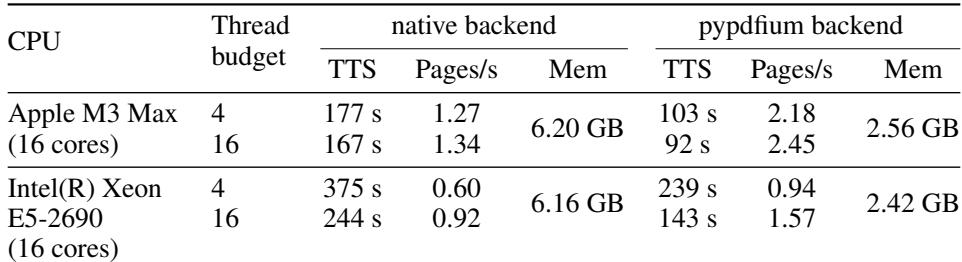
The evaluation compares the Docling pypdfium and native backends on an Apple M3 Max and an Intel Xeon system, varying thread counts from 4 to 16, to assess runtime, memory usage, and output quality. The pypdfium backend consistently delivers about 40% faster processing and less than half the memory footprint, but at the expense of table recovery accuracy. The Apple M3 Max achieves roughly double the throughput of the Xeon, while thread scaling yields a much larger runtime reduction on the Intel server than on the MacBook.